Cybersecurity Capstone — VIP Events (Stage 3: Roles and Access)
Cybersecurity Capstone — VIP Events (Stage 3)
This is Stage 3 of the VIP Events cybersecurity capstone, following on from the identity foundation I built in Stage 2. With the tenant, users, and security groups in place, this stage integrates the fictional VIP Foods application into that identity system and defines the role-based access model that actually governs it. I built this in the same live Entra ID tenant as before, and — same as Stages 1 and 2 — documented the group-based assignment approach as the production recommendation wherever the Free tier gets in the way.
Application integration and app roles
I registered the VIP Foods application in Entra ID and defined eight app roles inside that registration — one for each employee group established across Stages 1 and 2 (see Figure 1). Each role carries a distinct value that the application reads out of the token at sign-in, so a user’s experience is automatically tailored to whatever their role actually permits.
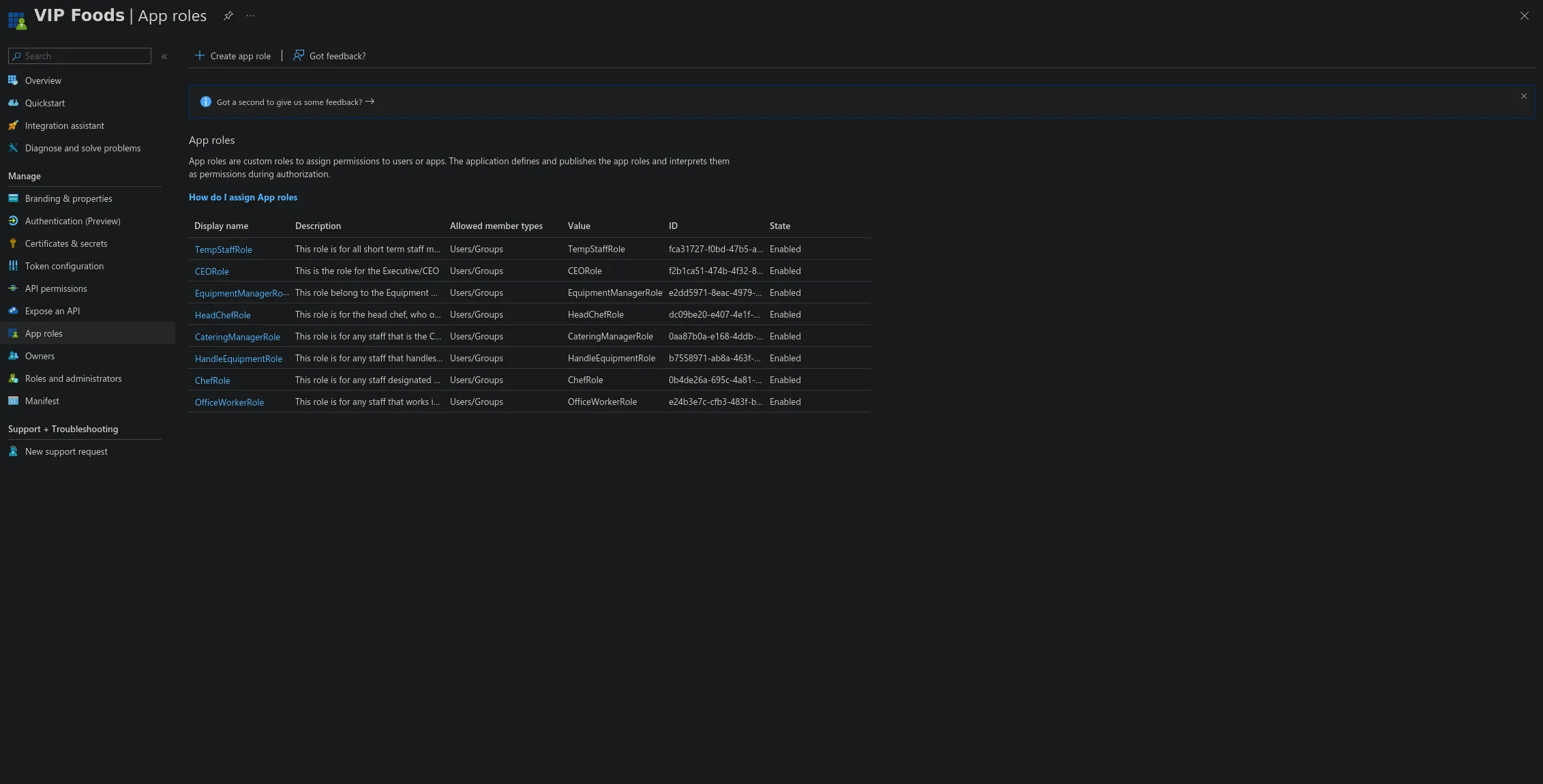 Figure 1: The eight VIP Foods app roles, all enabled, with Users/Groups member type.
Role configuration
Each app role is scoped to a single area of responsibility, so nobody ends up operating outside the functional domain their job actually requires. VIP Foods exposes five functional areas — equipment management, kitchen management, event management, administration, and day-to-day tasks — and every role maps onto those:
- HandleEquipmentRole (Equipment Handlers) — day-to-day equipment tracking and handling: logging equipment in and out, recording condition, and updating status. Operational only — no configuration or oversight authority.
- EquipmentManagerRole (Equipment Manager) — full oversight of the equipment function: everything a handler can do, plus adding and retiring equipment, scheduling maintenance, and managing the catalogue.
- ChefRole (Chefs) — food preparation and kitchen tasks: viewing and updating kitchen and prep data. No authority over equipment, events, or administration.
- HeadChefRole (Head Chef) — elevated kitchen management: everything a chef can do, plus coordinating operations, approving menus, and overseeing the kitchen team.
- CateringManagerRole (Catering Manager) — event and catering coordination: event planning, menu planning, and logistics. Cross-touches kitchen and event data but has no authority over equipment internals or corporate finance.
- OfficeWorkerRole (Office Workers) — administration and data management: the records and admin functions that support the operational teams. No operational or kitchen authority.
- CEORole (CEO/Owner) — strategic oversight, with full access to all functional areas. This is the one intentional exception to strict isolation, justified by the role — and because it’s the highest-value identity, it’s the primary target for the strongest Conditional Access and MFA controls in Stage 5.
- TempStaffRole (Transient Staff) — only the specific day-of tasks assigned for an engagement. Access is minimal, time-boxed, and — in production — revoked automatically at the end of the engagement.
The guiding principle is that responsibility defines the role, and the role defines the permissions: no role is granted authority outside the functional area its job requires.
Permissions per role
Permissions are assigned on a least-privilege basis — each role gets only what its responsibilities require, and nothing beyond that. The matrix below maps every role against the app’s functional permissions. Only the CEO holds full access; every other role stays inside its own lane, and administrative permissions (user/role management) are withheld from every line-of-business role.
| Permission | HandleEquip | EquipMgr | Chef | HeadChef | CateringMgr | OfficeWorker | CEO | TempStaff |
|---|---|---|---|---|---|---|---|---|
| View equipment records | ✅ | ✅ | ❌ | ❌ | ❌ | ❌ | ✅ | ❌ |
| Update equipment status / log movements | ✅ | ✅ | ❌ | ❌ | ❌ | ❌ | ✅ | ❌ |
| Add / retire equipment, schedule maintenance | ❌ | ✅ | ❌ | ❌ | ❌ | ❌ | ✅ | ❌ |
| View kitchen / food-prep data | ❌ | ❌ | ✅ | ✅ | ✅ | ❌ | ✅ | ❌ |
| Update kitchen / food-prep data | ❌ | ❌ | ✅ | ✅ | ❌ | ❌ | ✅ | ❌ |
| Manage kitchen operations (elevated) | ❌ | ❌ | ❌ | ✅ | ❌ | ❌ | ✅ | ❌ |
| Event / catering planning & logistics | ❌ | ❌ | ❌ | ❌ | ✅ | ❌ | ✅ | ❌ |
| Administration & data management | ❌ | ❌ | ❌ | ❌ | ❌ | ✅ | ✅ | ❌ |
| Assigned day-of tasks only (time-boxed) | ❌ | ❌ | ❌ | ❌ | ❌ | ❌ | ✅ | ✅ |
| User / role administration | ❌ | ❌ | ❌ | ❌ | ❌ | ❌ | ✅ | ❌ |
| Full system access | ❌ | ❌ | ❌ | ❌ | ❌ | ❌ | ✅ | ❌ |
Key least-privilege decisions:
- Equipment handlers cannot add or retire equipment — they can view and update status, but managing the catalogue is reserved for the Equipment Manager. This prevents an operational account from altering asset records.
- Chefs cannot manage kitchen operations — updating prep data is in scope, but the elevated coordination/approval functions are reserved for the Head Chef.
- Catering Manager can view kitchen data but not update it — they need visibility for event planning, not edit rights over food-prep records.
- No line-of-business role holds user/role administration — that permission sits only with the CEO (and, separately, the tenant administrator, who is not a VIP Foods app user). This keeps identity management out of operational hands.
- TempStaff holds only time-boxed, assigned-task access — the narrowest possible grant, revoked automatically at engagement end in production.
- CEO holds full access as the single justified exception, offset by the strongest authentication controls applied to that identity in Stage 5.
Mapping groups to roles
User groups map onto VIP Foods app roles following the Stage 2 group model — SG-EquipHandlers to HandleEquipmentRole, and so on. Assigning groups to an enterprise application needs Entra ID P1, so on this Free-tier build I demonstrated the mapping by assigning representative users directly to each role instead. In production, the security groups themselves would be assigned to the roles, so access follows group membership automatically and a new hire inherits the right role the moment they’re added to their group — no per-user assignment required. That’s the scalable, maintainable approach, and exactly why the group model got built in Stage 2 in the first place.
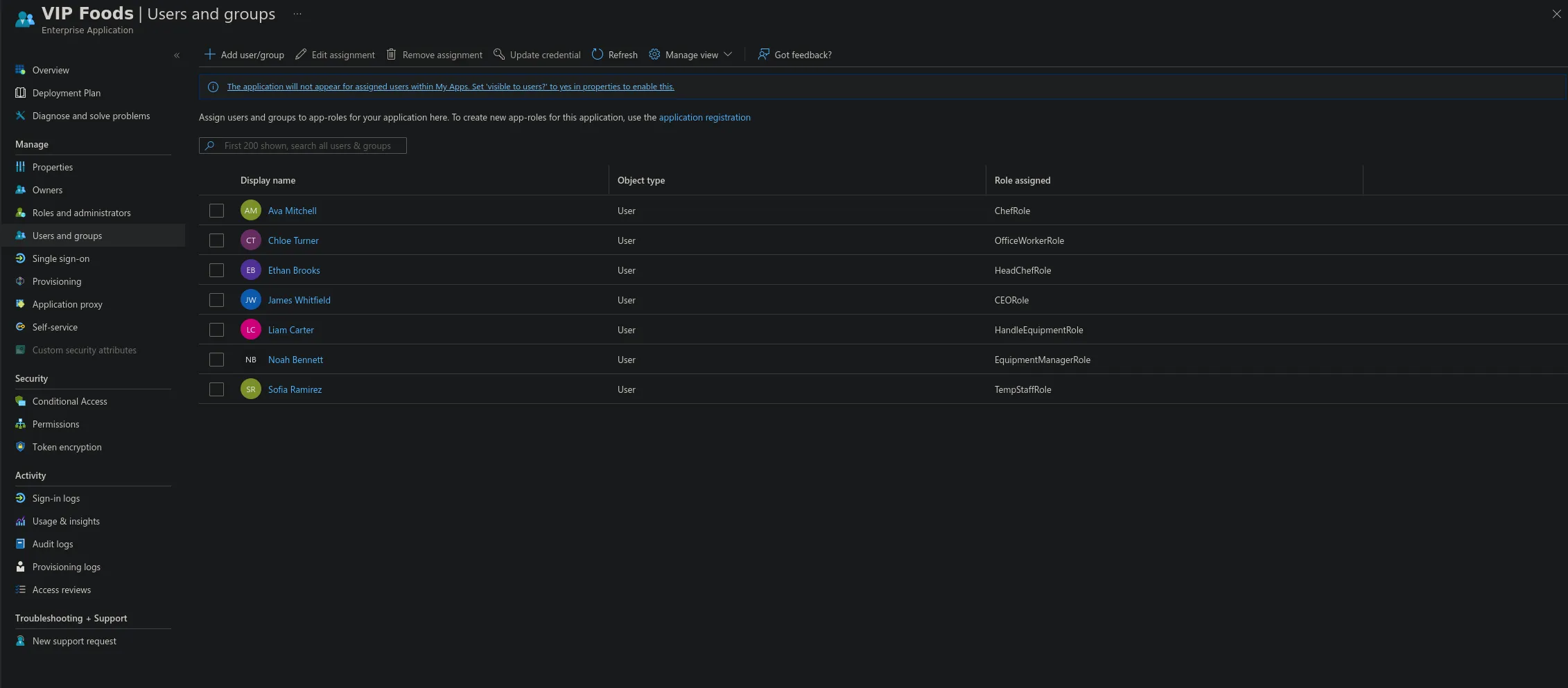 Figure 2: Each representative user assigned to their matching app role (groups in production).
VIP Events now has a complete role-based access model: an integrated application, eight least-privilege roles with defined permissions, and a group-to-role mapping that enforces the isolation designed back in Stage 1. Each role stays inside a single functional area, administrative permissions are withheld from every line-of-business role, and the CEO’s full access is offset by the strongest authentication controls. Stage 5 will layer Conditional Access policies over these roles to complete the Zero Trust posture, with particular focus on the high-value CEO and administrator identities.
This is Stage 3 of a five-stage capstone. Stage 1 (company requirements) and Stage 2 (Entra ID setup) precede it; Stage 4 (testing and validation) follows, along with Stage 5 (policy implementation).